Get Policies Node
Finds insurance policies associated with the provided customer or organization details. The flow can use the matching policies to determine the next step or show relevant policy information.
Use Case
Use this node in a Danish claims-intake flow when the flow needs to find the customer's insurance policies before continuing with claim handling. For example, after collecting the customer's identifying details and the incident date, the node can find relevant policies so the flow can identify or present the policy connected to the reported incident.
The node searches the All Policies API using the customer number, or the social security number when no customer number is provided. When the Customership search is enabled, it also looks up policies in the Customership API by the supplied social security number and/or organization number, using the country input (use DK for Denmark). Results from the searches are combined and duplicate policy numbers are returned only once. The flow can then use the number of matches and policy details to guide the next step.
User Interface
This node has no user-facing UI. It retrieves matching policies and writes the results to the flow outputs below.
Behavior
This node looks up policies for a customer and makes the matching policies available to the rest of the flow. It runs automatically and does not ask the customer a question.
Information needed
- Provide at least one way to identify the customer: a social security number, customer number, or organization number.
- Country and incident date are also required.
- If any of this information is missing, the search is not started and the flow receives a message that the required information was not provided.
Finding policies
- The node searches for policies using the customer number, when available; otherwise, it uses the social security number. The incident date is included in this search.
- Depending on the system's configuration, it may also check the customer register using the social security number or organization number. The country is used for these checks.
- Results from the searches are combined. A policy is listed only once, even if it appears in more than one search. Entries without a policy number are omitted.
- If claim area or business area is specified, only policies in that area are included. The special-groups option limits the results to eligible special-group policies.
What the flow receives
- The flow receives the number of matching policies and a list of those policies.
- If no policies match, the count is zero and the result indicates that no match was found.
- If one or more policies match, the result indicates success. When exactly one policy matches, its details are also provided as individual values, such as policy number, product, and insured item. With multiple matches, use the policy list to access each policy's details.
- If one search is unavailable, results from other completed searches can still be used.
Node Metadata
| Property | Description |
|---|---|
| Node class | GetPoliciesNode |
| MessageType | 69 |
| CanBeEdited | False |
| CanBeProcessedOnce | False |
| RequireUserResponse | No |
Input Properties
| Property | Description |
|---|---|
| incidentDate | Required incident date used by the All Policies search to find policies relevant to the reported incident. |
| country | Required country code, using the ISO 3166-1 alpha-2 format (for example, |
| customerSsn | Customer social security number. It is used for the All Policies search when |
| customerNumber | Customer number used by the All Policies search. If both |
| organizationNumber | Organization number. When Customership search is enabled, it triggers a Customership lookup by organization number. It is not used by the All Policies search. |
| claimArea | Optional, case-insensitive filter using the policy's |
| businessArea | Optional business-area filter. Use a business-area name from the policy data, such as |
| onlyWithSpecialGroups | When |
| defaultValidationMessage | The default error message shown when the input is invalid or missing. This is used if no custom validation message is provided.
|
| sectionId | Groups this node visually under a specific section in TellUs. When multiple nodes share the same |
| defaultValue | The initial value that is prefilled into the input field when the node is rendered. Useful for suggesting defaults or pre-populating known data. |
| isRequired | Determines whether the user must provide a value before continuing. If set to
|
| isRequiredValidationMessage | The error message shown when a required field is left empty. This overrides the default validation message when
|
Output Properties
| Property | Description |
|---|---|
| count | Number of unique policies remaining after duplicate removal and filters. Set to |
| policyData | The list of matching policy data, after duplicate removal and filters. Set to an empty string when no policies match. |
| policySystem | Policy system for the matching policy. This single-policy output is populated only when exactly one policy matches. |
| policyNumber | Policy number for the matching policy. This single-policy output is populated only when exactly one policy matches. |
| productName | Product name for the matching policy, when provided by the source. This single-policy output is populated only when exactly one policy matches. |
| type | Policy type for the matching policy. This single-policy output is populated only when exactly one policy matches. |
| insuredObjectName | Name or description of the insured object for the matching policy. This single-policy output is populated only when exactly one policy matches. |
| insuredObjectType | Type of the insured object for the matching policy. This single-policy output is populated only when exactly one policy matches. |
| businessArea | Business area for the matching policy, such as |
Editor Example
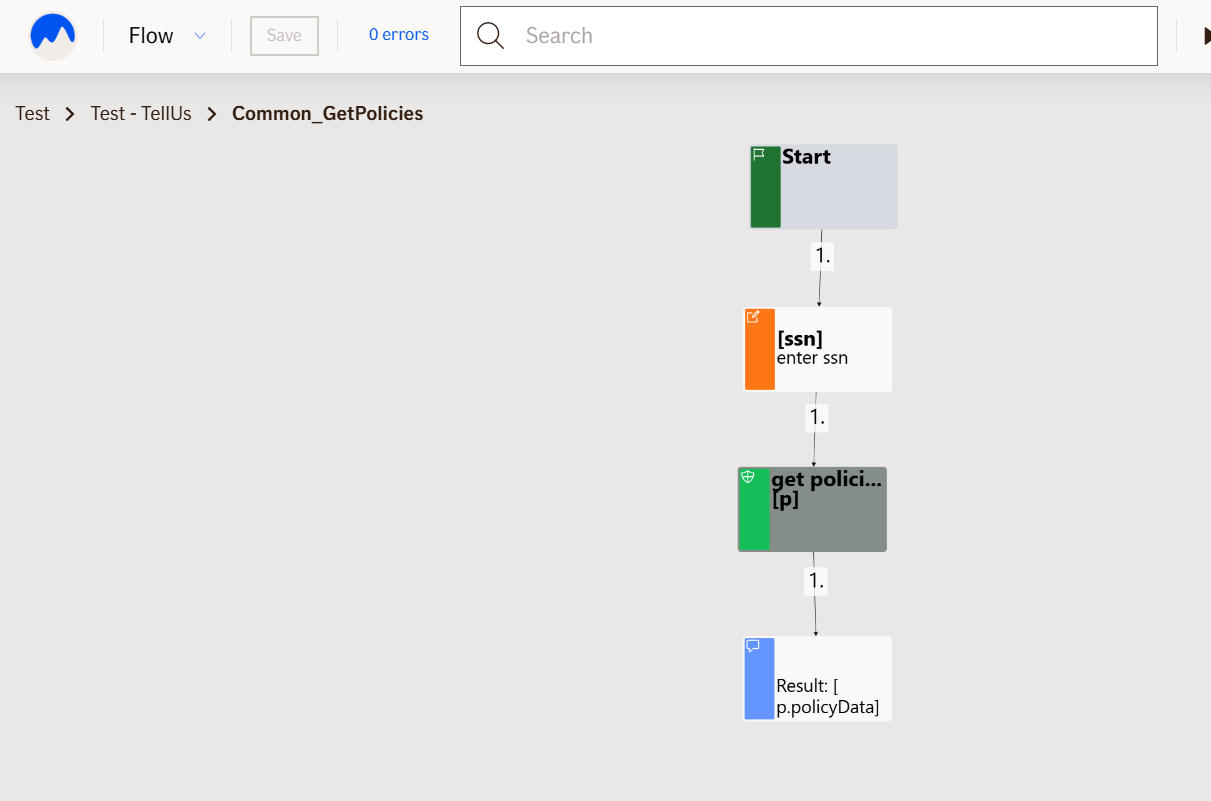
This link opens a prebuilt flow using this node in context. You can inspect how it's configured, how it's connected, and how it behaves in a real editor environment.