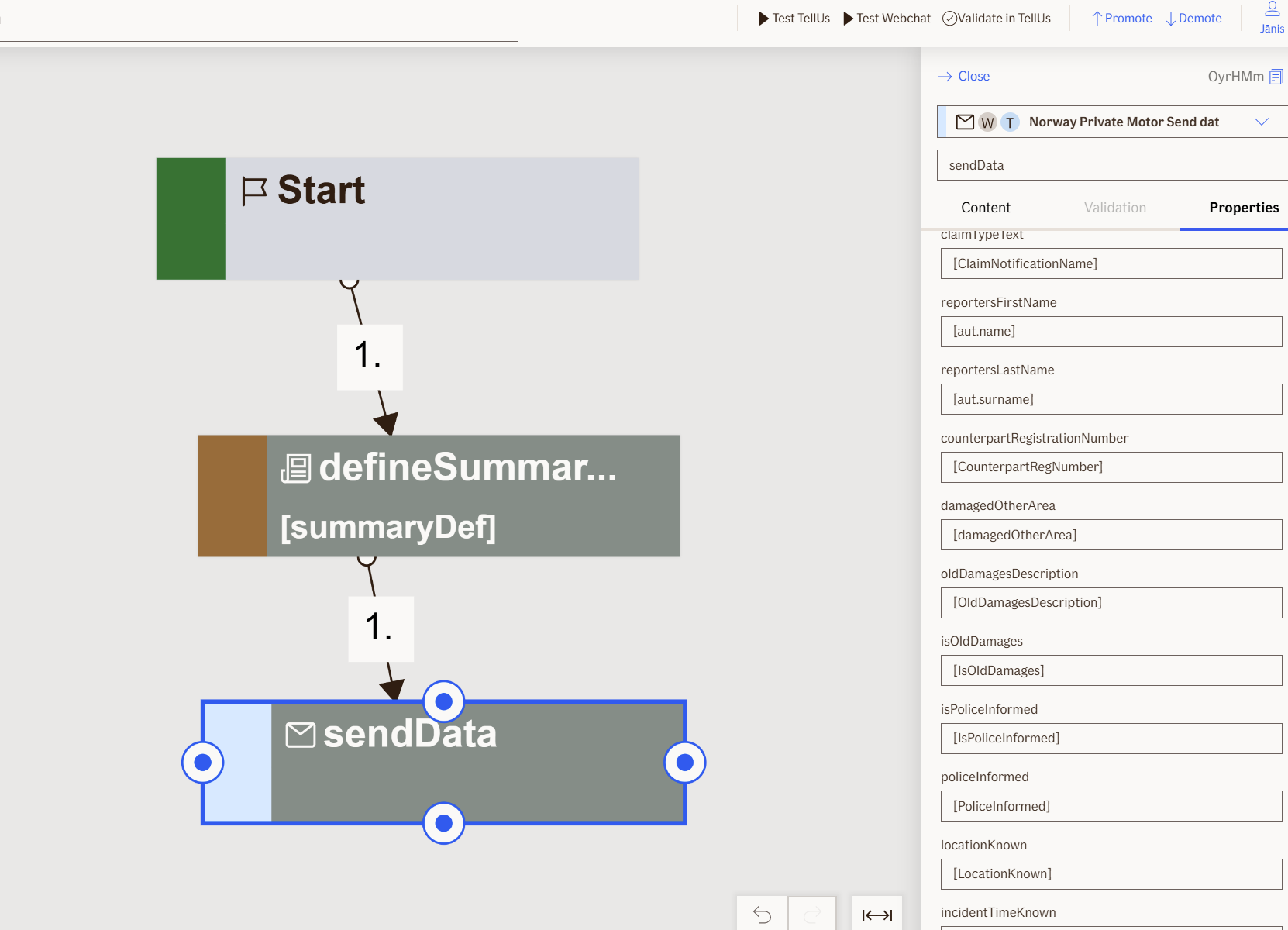
Send Data Node
The Send Data node is a non-visual private motor node that processes the claim information collected during the flow and sends it to multiple systems for storage and processing.
Use Case
Use the Send Data node when you want to:
- Submit a completed motor claim to the backend systems for processing and storage.
- Finalize a claim flow by storing the claim, registering it, and notifying relevant parties.
Don't use it when:
- The claim information is not fully collected; ensure all required inputs are provided.
- You need to send data to systems other than the claim processing backend.
- You already have another
Send Datanode executing in the same flow.
UI Examples
- TellUs
- WebChat
Only output, no UI
Only output, no UI
Behavior
When Send Data node is executed, it starts the following actions:
- Stores the claim
- Verifies the bank account
Then, depending on the brand:
- If Polestar or Volvia:
- Starts Fronten activity
- Creates branded activity in Fronten for injured party
- Sends customer notification
- Otherwise:
- Sends claim to Pasi
Additional characteristics:
- Non-blocking: the node executes in the background without user interaction.
- Requires input: expects all collected claim information (policy, incident, claimant, bank account, brand details, etc.).
- Renders: no UI elements.
- No outputs: this is a final processing node; it does not produce variables for subsequent nodes.
Node Metadata
| Property | Description |
|---|---|
| Node class | SendDataNode |
| MessageType | 107 |
| CanBeEdited | False |
| CanBeProcessedOnce | True |
| RequireUserResponse | No |
Input Properties
| Property | Description |
|---|---|
| reporterSsn | The social security number of the person reporting the claim. |
| driverSsn | The social security number of the driver involved in the incident. |
| birthDate | The birth date of the claimant. |
| vehicleRegistrationNumber | The registration number of the vehicle involved in the incident. |
| incidentType | The type of incident that occurred. |
| incidentDate | The date when the incident occurred. |
| incidentTime | The time when the incident occurred. |
| incidentCircumstance | The circumstances surrounding the incident. |
| incidentCause | The cause of the incident. |
| hasSummerTires | Indicates whether the vehicle had summer tires at the time of incident. |
| speedLimit | The speed limit at the location of the incident. |
| speed | The speed the vehicle was traveling at the time of the incident. |
| currentMileage | The current mileage of the vehicle at the time of incident. |
| hasPoliceBeenInPlace | Indicates whether police attended the incident scene. |
| isOwnVehicleDamaged | Indicates whether the insured's own vehicle was damaged. |
| damageArea | The area of the vehicle where damage occurred. |
| vehicleLocation | The location where the vehicle is currently located. |
| isDamagedObjects | Indicates whether objects other than the vehicle were damaged. |
| hasAlcoholOrDrugsInvolved | Indicates whether alcohol or drugs were involved in the incident. |
| hasDriverTheLicense | Indicates whether the driver had a valid license at the time of incident. |
| hasFallenAsleep | Indicates whether the driver fell asleep during the incident. |
| hasMobileOrOtherScreenUsed | Indicates whether a mobile phone or other screen was being used during the incident. |
| isInjuredPersons | Indicates whether there are injured persons in the incident. |
| injuredRole | The role of the injured party in the incident. |
| isOtherCosts | Indicates whether there are other costs associated with the claim. |
| emailAddress | The email address of the claimant. |
| phoneNumber | The phone number of the claimant. |
| summaryDefinition | The definition of the claim summary to be sent. |
| customerNumber | The customer number of the policy holder. |
| carPolicyNumber | The policy number for the vehicle insurance. |
| brand | The vehicle brand or insurance product brand. |
| claimTypeText | The type of claim being reported. |
| reportersFirstName | The first name of the person reporting the claim. |
| reportersLastName | The last name of the person reporting the claim. |
| counterpartRegistrationNumber | The vehicle registration number of the counterpart in the incident. |
| damagedOtherArea | Additional area information if damage extends beyond the main damage area. |
| oldDamagesDescription | A description of pre-existing damages on the vehicle. |
| isOldDamages | Indicates whether there are pre-existing damages on the vehicle. |
| isPoliceInformed | Indicates whether police have been informed of the incident. |
| policeInformed | Details about police involvement in the incident. |
| locationKnown | Indicates whether the exact location of the incident is known. |
| incidentTimeKnown | Indicates whether the exact time of incident is known. |
| isCounterparts | Indicates whether there are counterparts involved in the incident. |
| perpetratorKnown | Indicates whether the perpetrator is known. |
| damageDescription | A description of the damage to the vehicle. |
| frontenBusinessArea | The business area classification for the Fronten system. |
| frontenQueueCode | The queue code that determines where the claim is routed in Fronten. |
| frontenCategoryCode | The category code for the claim in the Fronten system. |
| frontenDocumentTypeCode | The document type code for the Fronten system. |
| rejectAutomatically | Indicates whether the claim should be rejected automatically. |
| bankAccountOwner | The name of the bank account owner. |
| bankAccountNumber | The bank account number for claim payment. |
| bankAccountOwnerSummaryMessage | Summary message about the bank account owner.
|
| notBankAccountOwnerSummaryMessage | Summary message when the claimant is not the bank account owner.
|
| bankAccountNotVerifiedSummaryMessage | Summary message displayed when bank account verification fails.
|
| defaultValidationMessage | The default error message shown when the input is invalid or missing. This is used if no custom validation message is provided.
|
| sectionId | Groups this node visually under a specific section in TellUs. When multiple nodes share the same |
| defaultValue | The initial value that is prefilled into the input field when the node is rendered. Useful for suggesting defaults or pre-populating known data. |
| isRequired | Determines whether the user must provide a value before continuing. If set to
|
| isRequiredValidationMessage | The error message shown when a required field is left empty. This overrides the default validation message when
|
Output Properties
No output properties.
Editor Example
This link opens a prebuilt flow using this node in context. You can inspect how it's configured, how it's connected, and how it behaves in a real editor environment.